Icon
Icon
School

IT classroom

Icon Icon
Icon

Modern developments in digital literacy

Our IT classroom is a place where pupils learn the language of the digital world step by step. They work with text and presentations, try their hand at the basics of programming, learn to edit images, search for and verify information, process data and use AI. The lessons also focus on developing digital literacy – that is, understanding how technology works and how to use it safely and sensibly.


How an IT classroom enhances teaching

  • Computer-based learning promotes logical thinking, teaches pupils to solve practical problems, and develops creativity and imagination.
  • Pupils learn how to use AI correctly, create prompts and verify the accuracy of information.
  • In addition to basic IT education, those who enjoy computers have the opportunity to explore the subject in greater depth, both during lessons and in afternoon courses.
Find out more about our programmes

What sort of robots do we have?

The world of technology, presented in an entertaining way

Lessons in the IT classroom are hands-on and naturally linked to other subjects. Pupils tackle real-world tasks, devise solutions and propose procedures, both independently and as part of a team. For those who enjoy the world of technology, we offer afternoon specialist courses: ‘Introduction to the World of IT’ and ‘Basics of 3D Printing’. In these courses, pupils further develop their practical skills in using computers or in modelling and understanding how 3D printers work.
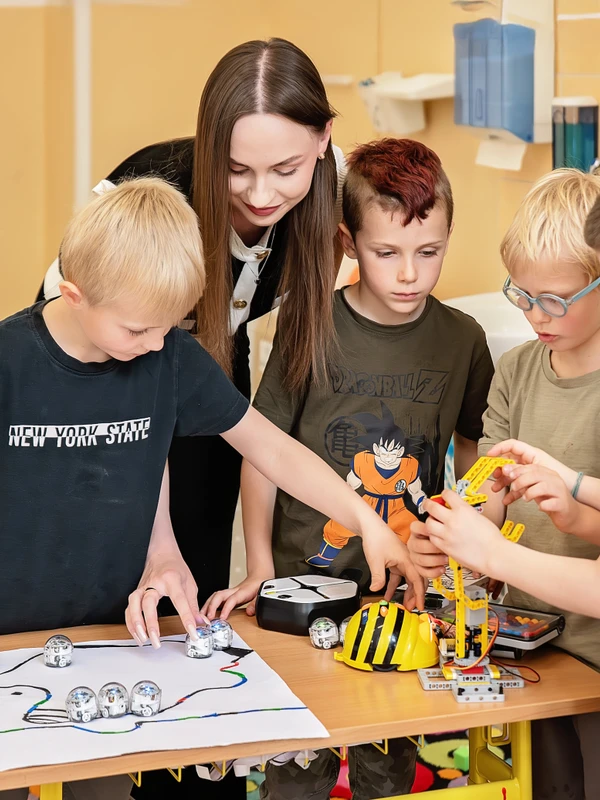
As well as working on computers, we also use educational robots. Pupils programme them using simple algorithms, test their behaviour in various situations, work with sensors and learn to debug errors. This allows them to see first-hand how code translates into movement, light or sound, and to gain a better understanding of control logic and the principles of automation. The lessons foster independence, collaboration and the joy of discovery, all of which have clear practical applications.
Bee Bot

Bee-Bots are ideal for taking the first steps into the world of programming. Children learn the basic principles of algorithmic thinking using simple button controls. Pupils programme the Bee-Bot by entering a sequence of directions directly on the robot. We use themed mats (e.g. letters, numbers, a city map) that link computing with other subjects, such as maths, English and general studies. We most commonly use the Bee-Bot in Years 0–2.

Ozobot

Ozobots are a natural progression from Bee-Bots, encouraging pupils to be more creative and to think logically. Ozobots use optical sensors to detect lines and colours. This enables them to follow a route drawn by pupils and respond to pre-defined colour codes, which alter their behaviour. Pupils can thus create their own maps, mazes, traffic playgrounds or race tracks. We most often use Ozobots in Years 2 to 5.

Lego Education Spike

LEGO SPIKE develops computational thinking through building your own models and programming them using a block-based language. Children can work individually, in pairs or in teams, designing and testing solutions to practical tasks whilst learning about algorithmisation, measurement, and working with sensors and motor components. We use LEGO across all year groups as a bridge between intuitive play and systematic programming.

iRobot Root

Root takes programming education to the next level. It supports working with sensors, drawing, sounds and more complex algorithms. It offers three levels of programming (from icons through blocks to text-based code), enabling differentiated teaching from primary school right through to secondary school. Root serves as a suitable bridge between simple block-based programming and the structure of real code.

Micro:bit

The Micro:bit is a versatile, programmable microcomputer which pupils are introduced to as early as primary school and continue to use right up to Year 9. Children can use it to create simple games, control lights or work with motion and sound sensors. The Micro:bit also serves as a control unit for other devices, thereby linking software with physical hardware. Programming is most commonly carried out in the MakeCode environment, where children can programme using blocks, JavaScript or the Python programming language.

Cutebot

Cutebots use the Micro:bit as a control unit and introduce pupils to the basic concepts of robotics, sensor technology and electrical engineering. We mainly use them in the second stage of primary school, where pupils programme movement, LED lighting, sound and reactions to obstacles. Cutebot develops not only technical skills, but also logical and systematic thinking.

Meowbit

Meowbit is a specialised gaming microcomputer inspired by classic consoles, which pupils use to create their own games, animations and interactive applications. We use it across all year groups. Pupils programme using the Arcade environment (blocks, JavaScript or Python), whilst learning to work with graphics, events, sound and character control. Meowbit develops not only IT skills, but also aesthetic and game design thinking.

Would you like to know more?

Please get in touch and we’ll arrange a meeting where we’ll provide you with more detailed information about the school, teaching, lessons, teachers and much more.
Arrange a meeting
Icon
Privacy and cookies settings 🍪

This website uses cookies to provide services, personalise adverts and analyse visitor traffic.


By selecting the option below, you agree to our Privacy and Cookies Policy. You can change your settings at any time.

Customise